Capacity
See what your sites really use against the package, and upgrade before anything is refused.
Capacity, step by step
-
1
Three meters per cluster
CPU and memory count each site’s busiest moments over the last 24 hours. Disk counts what is provisioned.
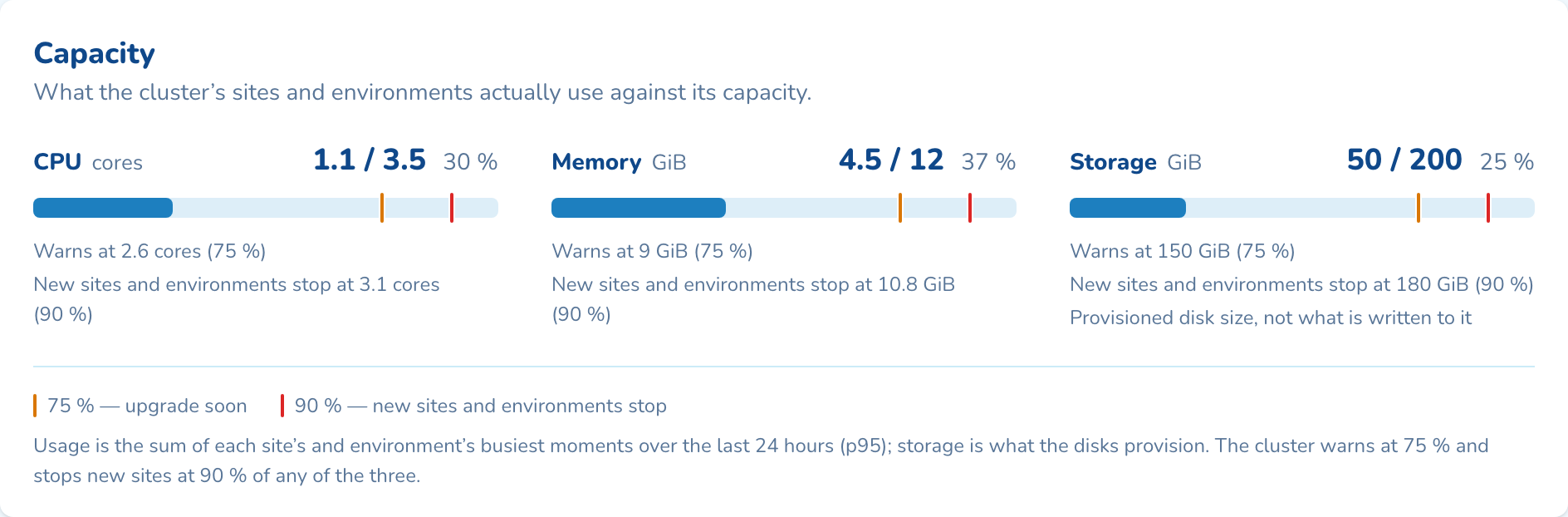
-
2
An amber warning at 75%
Past 75% on any meter, the card says upgrade soon. At 90%, new sites and environments wait until you upgrade.
-
3
Needs attention tells you
A full meter, a site near its limit or a failed task is listed on the dashboard, most urgent first.
-
4
Upgrade the package
Pick a bigger package and type the cluster name. Capacity grows straight away and nothing restarts.
Questions about capacity
Nothing stops. Sites already running carry on as before. New sites and environments are refused at 90% until you upgrade the package or remove something.
No. Capacity grows straight away and nodes are added as sites need them. The one exception is moving up from CC4, which changes node size, so each environment restarts once, one at a time.
Most sites are quiet most of the time. Counting what they use at their busiest, rather than what they could use, lets one cluster carry more sites.

See capacity on your own cluster
Tell us how many sites you run and on what. An engineer sizes a cluster with you and shows you the panel on a live one.