CoreCluster · Build

Create a site

Add a WordPress, Laravel or Magento 2 site to your cluster in three steps. It is ready in minutes.

manage.corefinity.com/managed-clusters
Create site
Step 1 of 3 · Platform and content
1 Platform2 Name and size3 Review

Platform

✓ WordPress Fresh install, PHP 8.3
Laravel Empty, ready for your repository
Magento 2 2.4.8 with OpenSearch

Start from

Fresh installWordPress 7.1, ready to log in
Empty site, I'll deploy my codeFrom Git, or over SSH
Each site gets its own pod, disk, database and SSH port.
CancelNext: name and size
{  How it works  }

Create a site, step by step

  1. 1

    Choose the platform

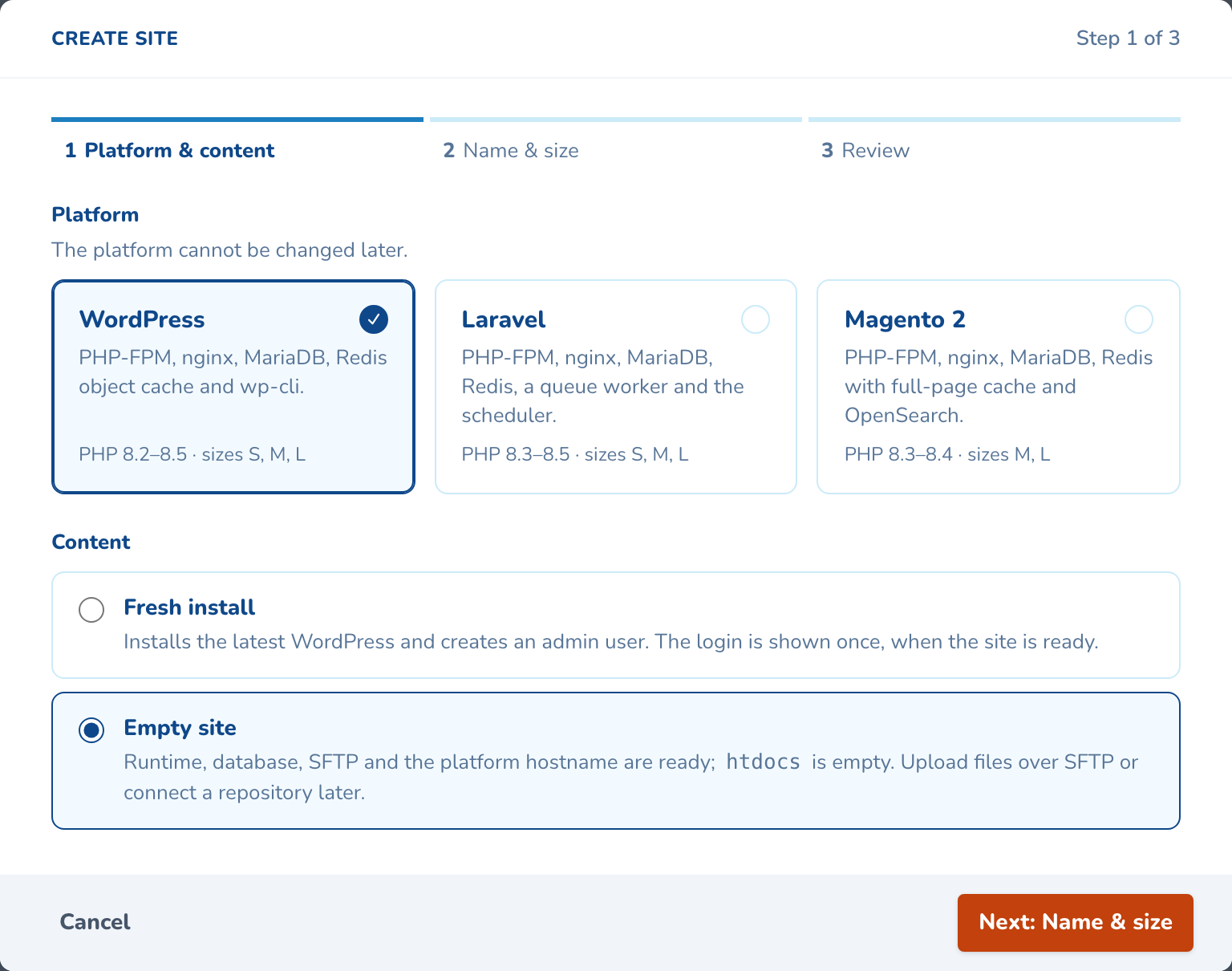
    Pick WordPress, Laravel or Magento 2. Start from a fresh install, or an empty site for your own code.
    manage.corefinity.com/managed-clusters
    Step 1 of Create site: WordPress, Laravel or Magento 2, then a fresh install or an empty site
  2. 2

    Name it and pick a size

    Type the domain, then choose PHP, MariaDB and a size. You see how full the cluster will be first.

    manage.corefinity.com/managed-clusters
    Create site
    Step 2 of 3 · WordPress, fresh install
    ✓ Platform2 Name and size3 Review
    Domainmarrowtide.co.uk
    PHP version8.3 (recommended)
    DatabaseMariaDB 11.8

    ✓A valid domain. DNS is not touched until you attach it; the site starts on marrowtide-co-uk-brindlewyck.cfstack.io.

    Size
    S · SmallBrochure sites and blogs2 vCPU · 4 GB · 10 GB disk
    M · MediumBusy sites and small shops4 vCPU · 8 GB · 30 GB disk
    L · LargeHigh traffic, big catalogues8 vCPU · 16 GB · 60 GB disk
    Cluster memory with this site 41 % → 46 %
    BackCancel
    Next: Review
  3. 3

    Check it and create

    The review lists everything the site gets, down to its SSH port. Your DNS is not touched.

    manage.corefinity.com/managed-clusters
    Create site
    Step 3 of 3 · Review
    ✓ Platform✓ Name and size3 Review
    PlatformWordPress, fresh install · admin sam, English (UK)
    Domainmarrowtide.co.uk · DNS is not touched until you attach it
    Platform addresshttps://marrowtide-co-uk-brindlewyck.cfstack.ionoindex
    PHP and databasePHP 8.3 · MariaDB 11.8 · Redis object cache
    SizeS · up to 2 vCPU, 4 GB memory, 10 GB disk
    SSHssh-brindlewyck-uk.cfstack.io, port 20004 · your company’s keys

    iThe site starts on its platform address, hidden from search engines. It is usually ready in about four minutes.

    BackCancel
    Create site
  4. 4

    Log in when it is ready

    Progress shows on the site page. A fresh WordPress or Magento install shows its admin login once, for you to store.

    manage.corefinity.com/managed-clusters
    marrowtide.co.uk Ready
    Created in 3 min 48 s by Sam Okafor
    Attach domain
    1. Address assigned
    2. Hostname published
    3. Saved
    4. Site started
    5. WordPress installed
    6. Ready

    WordPress admin loginShown once

    Admin address
    https://marrowtide-co-uk-brindlewyck.cfstack.io/wp-admin/Copy
    Username
    samCopy
    Password
    qT7v-mR2k-Lx9w-Hc4pCopy

    !Store it in your password manager now. The panel does not keep it and cannot show it again.

manage.corefinity.com/managed-clusters
Step 1 of Create site: WordPress, Laravel or Magento 2, then a fresh install or an empty site
manage.corefinity.com/managed-clusters
Create site
Step 2 of 3 · WordPress, fresh install
✓ Platform2 Name and size3 Review
Domainmarrowtide.co.uk
PHP version8.3 (recommended)
DatabaseMariaDB 11.8

✓A valid domain. DNS is not touched until you attach it; the site starts on marrowtide-co-uk-brindlewyck.cfstack.io.

Size
S · SmallBrochure sites and blogs2 vCPU · 4 GB · 10 GB disk
M · MediumBusy sites and small shops4 vCPU · 8 GB · 30 GB disk
L · LargeHigh traffic, big catalogues8 vCPU · 16 GB · 60 GB disk
Cluster memory with this site 41 % → 46 %
BackCancel
Next: Review
manage.corefinity.com/managed-clusters
Create site
Step 3 of 3 · Review
✓ Platform✓ Name and size3 Review
PlatformWordPress, fresh install · admin sam, English (UK)
Domainmarrowtide.co.uk · DNS is not touched until you attach it
Platform addresshttps://marrowtide-co-uk-brindlewyck.cfstack.ionoindex
PHP and databasePHP 8.3 · MariaDB 11.8 · Redis object cache
SizeS · up to 2 vCPU, 4 GB memory, 10 GB disk
SSHssh-brindlewyck-uk.cfstack.io, port 20004 · your company’s keys

iThe site starts on its platform address, hidden from search engines. It is usually ready in about four minutes.

BackCancel
Create site
manage.corefinity.com/managed-clusters
marrowtide.co.uk Ready
Created in 3 min 48 s by Sam Okafor
Attach domain
  1. Address assigned
  2. Hostname published
  3. Saved
  4. Site started
  5. WordPress installed
  6. Ready

WordPress admin loginShown once

Admin address
https://marrowtide-co-uk-brindlewyck.cfstack.io/wp-admin/Copy
Username
samCopy
Password
qT7v-mR2k-Lx9w-Hc4pCopy

!Store it in your password manager now. The panel does not keep it and cannot show it again.

{  What you can set  }

Options and limits

Everything here is per site or per environment, from the panel, with every change in the activity log.

Platforms
WordPress, Laravel and Magento 2. The platform is fixed once the site exists.
Start from
A fresh install with an admin user, or an empty site ready for SFTP or Git.
Sizes
S, M or L for WordPress and Laravel. M, L or XL for Magento 2, as your package allows.
PHP and MariaDB
PHP 7.4 to 8.5 and MariaDB 11.4 to 12.3, by platform; new sites start on PHP 8.3. Switch PHP or upgrade MariaDB later.
Every site gets
Its own disk, database, Redis cache, SSH and SFTP port, and a platform address.
Platform address
Like marrowtide-co-uk-brindlewyck.cfstack.io. Open to the web and hidden from search engines.
Time to ready
About 4 minutes for WordPress, 8 for Laravel and 25 for Magento 2. Empty sites take 2 or 3.
How many
No fixed number. New sites pause only when the cluster passes 90% of CPU, memory or disk.

Questions about create a site

No. The site starts on its own platform address, open to the web but hidden from search engines. You point your domain at it when you attach the domain, once the site is ready.

The size step shows the cluster with the new site added. Past 75% of CPU, memory or disk the panel suggests an upgrade, and at 90% new sites wait for one. Nothing caps the number of sites.

Yes. Choose an empty site and the runtime, database and SFTP are ready with an empty web root. Upload over SFTP, or connect a Git repository and deploy on push.

{  CoreCluster  }

See create a site on your own cluster

Tell us how many sites you run and on what. An engineer sizes a cluster with you and shows you the panel on a live one.

By sending this message you agree to our Privacy Policy .